So today I opted in for the Adobe Illustrator CC 2015 trial (Windows version). I had Creative Cloud installed with Photoshop and Lightroom already so just hit the Try button and waited. The setup finished quickly and without any error so I launched the new Illustrator and seen a Configuration Error message with an Error code 16. Not too talkative. Also the Illustrator icon was a blank page instead of the Ai stuff.
So this is what I tried, so far
1) Uninstalled and reinstalled Illustrator.
2) Uninstalled everything then launched Adobe's Creative Cloud Cleaner and cleaned up everything, then reinstalled.
3) I tried several methods manually also looked up this issue on Google without any luck. I've seen some weirdness around Windows Security on the files so I guess this was some kind of a Permission/Security issue which happened during the installation from the Cloud.
4) I was able to launch Illustrator as an Administrator, it seems the elevated privileges overcame of the security issues but of course this is not fixed the initial problems.
This was the time when I decided to contact with Adobe support. They tried to repair it through a remote session and they simply enabled Run as Administrator in the Compatibility dialog and said it is OK now, use it this way. Icon was not fixed and also I don't really like such "solutions". It is like my car has weird noises when going above 50 mpg and the repairman's solution is to move slower than 50mph, see, all is fine, problem fixed.
So after this unsuccessful attempt I had an idea. I've downloaded Adobe Illustrator CC 2015 from torrent (yep, I know... wait for it) and installed it. The software appeared fine in CC and started my Trial this way. All the issues are gone, icon visible, Error 16 gone and no need to launch it as Administrator. After this, I applied latest updates to it from CC Control Panel, everything went fine, still working good in trial mode. I did not use any keygen/cracks for it so the result is 100% legal, but I had to use a not-so-legal source to install it. Interesting.
Friday, June 17, 2016

Wednesday, May 4, 2016
Saturday, April 30, 2016
Western Digital Red vs. Green
Just made an update to my workstation, I had a pretty old 500GB WD Black hard disk and a not-so-old 1TB WD Green disk. Now I've replaced both of them with a 3TB WD Red NAS disk. Made a quick test with AIDA64, here are the results, not a bad upgrade IMHO.
WDC WD30EFRX (3TB Red NAS) vs WDC WD10EADS (1TB Green)
WDC WD30EFRX (3TB Red NAS) vs WDC WD10EADS (1TB Green)
 |
| AIDA64 Disk Benchmark |
Sunday, January 17, 2016
iOS Build number
Okay, an interesting thing about iOS 9.3 first beta. When you get the build number, it appends a /0 char at the end of the string. Made a quick fix for this, here is the code to get clean build number:
Tuesday, November 12, 2013
ASUS Orion PRO ROG headset review
Long time, no post. That's a bad thing but jump right in the middle of a new post by a review of the ASUS Orion PRO headset.
I looked for a headset with decent sound quality and comfortable wear for a reasonable price. I guess most people have these points on their priority list. I already have a Sennheiser HD515 which has a really good sound quality but not too durable and also it doesn't have a mic so I kept this for music purposes. Also since our daughter born the overall noise in our apartment increased big time. So an open type headphone is less practical.
The ASUS headset comes with the Spitfire USB powered small headphone amp with three buttons: FPS, SURROUND and AMP. It has a fixed USB cable and two 3.5" jack ports for the headphone and mic. All included cables are great quality, looks durable and sleeved. They included a cable holder kinda thingy but this isn't holding too tight so after some light usage it usually pops open.
The headphone is full plastic, the ear pods made of a leather like material (probably some plastic) but it is soft and I have no issue keeping that on my head for longer periods. The noise isolation (passive) is good for home usage. I can hear talking, phone ringing, baby crying around me but much less disturbing than with a simple open headphone.
Sound quality is really subjective. I feel the Sennheiser HD515 better with wider sound range. I did not tried the ASUS without the USB amplifier thing and after several months I feel the best sound quality for both music/gaming is keeping the FPS and AMP option on.
Overall I think it is a good gaming headset. The price for it + the USB amp is OK but if you already have a good sound card and you don't need the USB amp then I'd recommend to find a better quality gear for the same price. Mainly for music, movie purposes it is definitely a not recommended due the sound quality. For this price range it is easy to find a better headphone.
I looked for a headset with decent sound quality and comfortable wear for a reasonable price. I guess most people have these points on their priority list. I already have a Sennheiser HD515 which has a really good sound quality but not too durable and also it doesn't have a mic so I kept this for music purposes. Also since our daughter born the overall noise in our apartment increased big time. So an open type headphone is less practical.
The ASUS headset comes with the Spitfire USB powered small headphone amp with three buttons: FPS, SURROUND and AMP. It has a fixed USB cable and two 3.5" jack ports for the headphone and mic. All included cables are great quality, looks durable and sleeved. They included a cable holder kinda thingy but this isn't holding too tight so after some light usage it usually pops open.
 |
| Good looking stuff |
 |
| Mic pulled out |
 |
| Cable holding thingy |
 |
| Small controller to mute the mic and adjust headphone volume |
Thursday, February 28, 2013
Java vulnerabilities
Since the big news about Java vulnerabilities, it seems we get almost daily updates to Java client. It seems Oracle trying hard to save their crap. Java is good but when websites using it (like banks for their online access) is bad. And since most companies disabled Java in their browsers or operating systems it is more and more difficult to use especially for novice users who just want to click & bank. I hope companies realizes the issue and start moving forward from Java to something better back end and pure HTML/CSS/JS on user end.
http://www.pcworld.com/article/2026990/oracle-rushes-out-another-java-update-fixing-50-vulnerabilities.html
http://www.pcworld.com/article/2026990/oracle-rushes-out-another-java-update-fixing-50-vulnerabilities.html
Wednesday, February 27, 2013
Internet Explorer 10 for Windows 7
Just installed it. Funny because it asked for a restart. A web brwoser. It seems Microsoft still integrating their browser a bit too deep into the operating system.
I'm a Chrome user but due to web dev, I have to keep IE and other browsers for testing purposes.
This update also caused some issue in Desktop Gadgets. We using "DXImageTransform.Microsoft.Gradient()" to render UI in the gadget and it seems this isn't working properly now. Thanks MS, time to debug :P
The browser looks like IE9, so far. I hope they did not make any other problems because IE browsers getting better and better since IE7 or IE8... I remember that IE6/7 caused some sleepless nights to tweak the HTML/CSS for web pages.
Update: I've found the answer for the problem. If you ran into the same problem then here is the info about the change: http://msdn.microsoft.com/en-us/library/ie/hh801215(v=vs.85).aspx
Update: I've found the answer for the problem. If you ran into the same problem then here is the info about the change: http://msdn.microsoft.com/en-us/library/ie/hh801215(v=vs.85).aspx
Tuesday, March 20, 2012
Walking Dead, really?
I know I know, long time, no new post... So, here is one. Just another Walking Dead season is over and I started to think about it. There will be spoiler below, so do not read below if you did not see the season finale episode yet.
So the first episodes of this series was pretty nice and good and I started to like it, but then there was a long-long-long part when they stuck in that farm. I'll think about this farm now.
As a fan of strategic games, one thing bugged me when they settled in the farm for the first time... It was pretty much clear that protecting such a place is difficult without making some changes. As the story continued they basically didn't do anything about this. I was sure about they will suck there, big time. According to the last version, I was right. They were basically no protection at all, so the walkers ran them in no time.
According to the story line there were there for a few weeks/months I guess so they had enough time to make major changes without just fighting with each other. So in the bad bad future if we may stuck in such a farm with zombies around, think guys, think.
I found a nice satellite map on Google with the farm, it is a pretty nice place but a bit difficult to protect from zombies, lol. So on the very first day I'd chop the trees in the area, as I marked on the map with red. With this amount of wood and with wire fence it is possible to start building a strong fence around the place. I guess a lot of resource available for free in the towns around, so with a truck it is possible to gather all tools and wires and other stuffs required in a few days. So I imagine a fence around the cleaned area, marked in light blue and one more fence as additional safety with dark blue. The purple spots are possible location of watchtowers. Of course it is still possible to get crowded with walkers but this double fence system will give a lot more time than waking up in the bed with a walker eating our legs, right? :) So the system needs a way to exit, and this is the yellow drawing. It is a small underground tunnel from below the house to a location outside the blue fence, with a hidden trap door or something, locked from the inside to keep walkers and other people outside. Of course it is good to keep weapons, ammo and cans of food, fresh water in the case the area is too dangerous to stay. This yellow location also needs a few cars filled up with gas with enough seats for everybody inside the house.

As a fan of strategic games, one thing bugged me when they settled in the farm for the first time... It was pretty much clear that protecting such a place is difficult without making some changes. As the story continued they basically didn't do anything about this. I was sure about they will suck there, big time. According to the last version, I was right. They were basically no protection at all, so the walkers ran them in no time.
According to the story line there were there for a few weeks/months I guess so they had enough time to make major changes without just fighting with each other. So in the bad bad future if we may stuck in such a farm with zombies around, think guys, think.
 |
| yikes |
I found a nice satellite map on Google with the farm, it is a pretty nice place but a bit difficult to protect from zombies, lol. So on the very first day I'd chop the trees in the area, as I marked on the map with red. With this amount of wood and with wire fence it is possible to start building a strong fence around the place. I guess a lot of resource available for free in the towns around, so with a truck it is possible to gather all tools and wires and other stuffs required in a few days. So I imagine a fence around the cleaned area, marked in light blue and one more fence as additional safety with dark blue. The purple spots are possible location of watchtowers. Of course it is still possible to get crowded with walkers but this double fence system will give a lot more time than waking up in the bed with a walker eating our legs, right? :) So the system needs a way to exit, and this is the yellow drawing. It is a small underground tunnel from below the house to a location outside the blue fence, with a hidden trap door or something, locked from the inside to keep walkers and other people outside. Of course it is good to keep weapons, ammo and cans of food, fresh water in the case the area is too dangerous to stay. This yellow location also needs a few cars filled up with gas with enough seats for everybody inside the house.

red = area needs cleanup, no trees, bushes..etc
dark blue = outer fence
light blue = inner fence
purple spots = watchtowers
yellow = escape tunnel
With such a setup I think people have much more options to survive and to keep the place safer. Also I really like the idea at the end, the woman with sword. Sword is good, much usable in close combat and it is virtually silent. So swords for everyone.
Monday, January 2, 2012
Lights of Budapest
Happy New Year to everyone!
I just wanted to drop a few photos I just made before the christmas lights will be removed from the city. So this is how Budapest looks like during this period of each year.
I just wanted to drop a few photos I just made before the christmas lights will be removed from the city. So this is how Budapest looks like during this period of each year.
 |
| Andrassy street, Budapest, Hungary |
 |
| Andrassy street, Budapest, Hungary |
 |
| Andrassy street, Budapest, Hungary |
 |
| Oktogon, Budapest, Hungary |
 |
| Andrassy street, Budapest, Hungary |
Saturday, December 24, 2011
Merry Christmas & How it's made
Merry Christmas to everyone! I've created a photo today for this opportunity and thought it would be interesting to share a little tutorial about how to use a simple photographic effect to achieve this result.

The name of the effect is the bokeh. You need to setup the scene in the following way:


The name of the effect is the bokeh. You need to setup the scene in the following way:

As you can see the drawing above, you need a relatively long distance between the camera and the lights (little bulbs, LEDs, whatever) and you have to place the glass close to the camera. You need to setup some soft light to lit the glass. I've used a softbox with a studio flash, but I just needed the model light, not the flash.
As for the camera, you will need a fast lens, at least f2.8 to have good results and of course a tripod is needed.
Set the focus on the glass and watch the lights on the background and position if necessary. Play a bit with the softbox light intensity to find the right balance on the scene, you will need a bit brighter fill light to avoid the background spots to burn in. Thats all. Easy effect, and no need any graphics work, photoshop..etc. This is a pure photographic trick. Enjoy.
Sunday, December 18, 2011
Night photography with iPhone?
It is possible, but of course we should not expect professional photos, though... I had the idea to write this little tutorial for ones are new to photography or just to show that we can capture some nice photos to our family album even in the night when we left the camera at home. I always saying a nicely captured low quality photo is much better than a missed one.
So the most important is the right timing, as you know the iPhone (and other phones and cheaper point and shoot cameras) are not the kings of the night. So we need to take these photos during the first half of the blue hour to have enough ambient light and colors to capture.
As you may know, there are two blue hours a day, in the morning and in the night. You can find out this time frame at your location using www.bluehoursite.com or the iPhone app, available here. The blue hour effect is stronger during the beginning so try to make the photos early. Later the sky will be too dark for the phone and the little dynamic range will result of burned out light spots, lots of dark areas and high noise.
Noise is the biggest issue with the photos currently. I did not test the iPhone 4S yet, but the iPhone 3G and iPhone 4 has relatively high noise. The iPhone 4 higher resolution helps a bit to reduce this though.
During the capture try to frame the scene as you wish and then tap on the screen to adjust focus and light meter to a relatively darker part to keep the balance on the image. If you taking image of some brighter lights then it may need to tap on this, to prevent burning in. If the lights are too bright you will lose all the details around it.
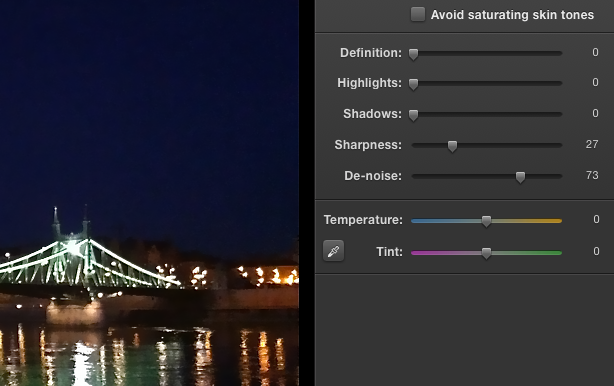
According to my experience the white balance and other settings are just right as you take the photo, no adjustments needed. The noise will be high so you may want to reduce it with a noise reduction software. There is an option to this right in iPhoto on Mac, it has a relatively good results. You need to pick some higher values but always check the results and fine tune if needed.
During the capture try to frame the scene as you wish and then tap on the screen to adjust focus and light meter to a relatively darker part to keep the balance on the image. If you taking image of some brighter lights then it may need to tap on this, to prevent burning in. If the lights are too bright you will lose all the details around it.
 |
| tap on a darker area before shoot. Sorry for the blur, not easy to hold steady while taking a screen shot :) |
 | |
|

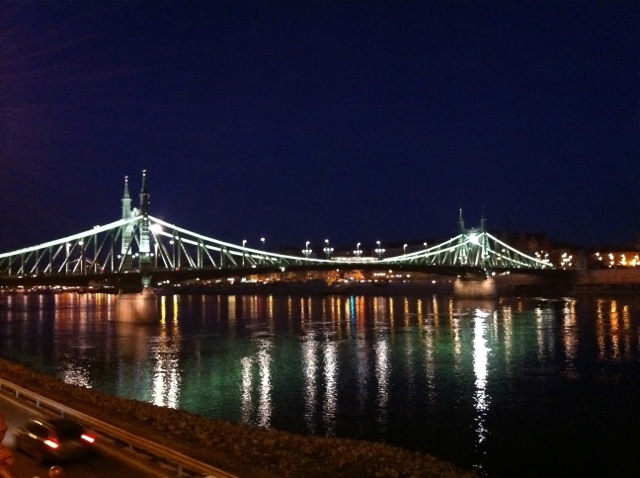 |
| Results from iPhoto |
There are other alternatives, like Noise Ninja (trial, win+mac), NDNoise (free, win+mac), Neat Image (trial, win+mac). These softwares can produce nice results but of course it is not magic.
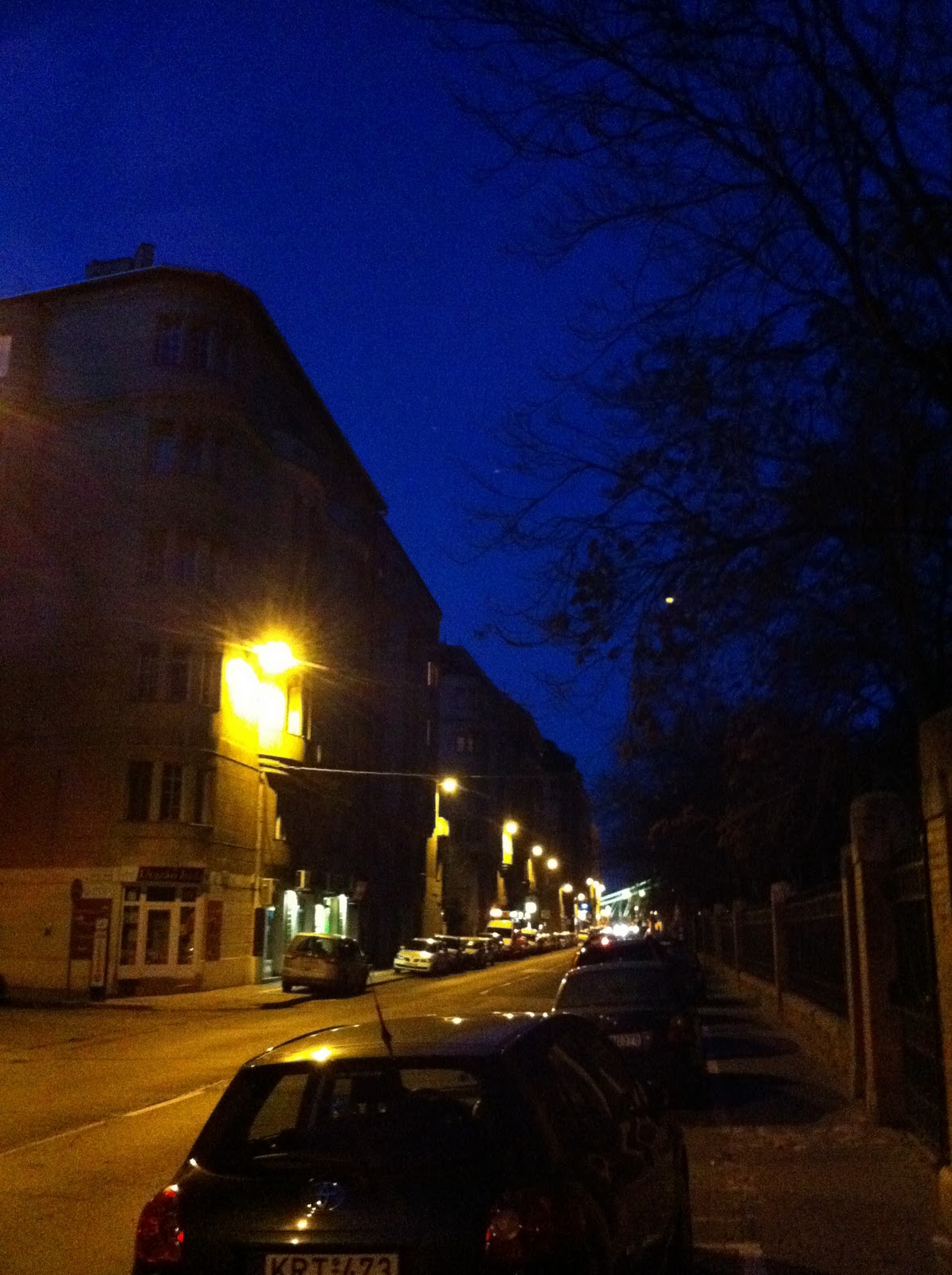 |
| untouched, taken with iPhone 4 |
Thursday, October 6, 2011
Good bye Steve, and thanks for everything!
We can thank him a lot of things, not just iPhone and Mac, but the basic fundamentals of the today's computers.
 |
| One brand to rule them all |
This week when I watched the Keynote event, on the first few minutes I saw an empty chair with a reserved sign in the center of the first line. I noted that who is that person who has a reserved chair in such an event and misses it. Now I know it. I missed Steve from the event, he was the best in these presentations. I enjoyed all of them. I think in the next few days I'll watch previous Keynotes to remember.
We all knew this will happen, Steve was not in a good shape recently but this was way too early.
Rest in peace, Steve Jobs.
Sunday, October 2, 2011
Blue Hour Site, behind the scenes
What is all about?
I have a website, it is called Blue Hour Site. This site is able to help by calculating the best time frame for taking stunning blue hour pictures. Blue hour refers to the time after the sun goes below the horizon and the sky goes into deep blue for a while. Below you can see a photo took during this time:
 |
| Blue hour at Budapest, Hungary |
So where it began?
The idea came in 2008 when I was in Dresden, Germany. It was only a one night stay and I wanted to shoot some blue hour photos. I was not sure about when this time frame starts so during the day I looked for some nice vantage points in the city to get prepared but later that day at the hotel when I realized it is getting dark I did not have enough time to get back to my spots, it was totally dark when I was ready to take the photos. So I missed my one and only opportunity to take some photos there. I was not happy and as a developer I decided to create some code that tells me when blue hour will start on a given day and location. Later I thought more on this idea and got a new idea to create a website to this, it will be a good help to other photographers as well and also we living in the internet era, so why not doing this online.
Later that year I was ready with the website, it was much simpler than the current site, but it already worked well and it was accurate enough to put it online.
I sent the URL to my friends, shared it on web2 sites, wrote about it in photography forums and watched my statistics. More and more visitors came from different part of the world, but the traffic was really low during these weeks/months... I had days with only 1-2 visits.
Tuesday, September 27, 2011
Transformers - Dark of the Moon (2011)
I always liked the Transformers as an idea and the comic book, cartoon and the movies as well. With today's technology and CG solutions, we can see an amazing quality all across these movies. Personally I liked the first and the latest (this, the third) movie. I don't want to tell anything about the story and to ruin everything if you did not see it yet so just relax and keep reading. I'll only show some screen shots of the movie. Also one interesting and funny thing, the girl wears some high tech high heels, I guess transformers technology. Sometimes it transforms into flats, and then back to high heels. Awesome! Enjoy the screen shots and don't forget to watch this movie, it was a nice two and a half hours.
 |
| New Facebook profile page almost ready :) |
 |
| Buzz Aldrin |
 |
| Buzz Aldrin with Optimus |
 |
| Even nicer :) Rosie Huntington-Whiteley from Victora's Secret. Good choice! :) |
Friday, September 23, 2011
First try: Windows 8
Microsoft and its Windows 8 is a popular topic in these days. I really like new and intuitive UI and software solutions but I was a bit pessimistic about the screen shots and videos I've seen of the new UI. It is based on the idea Microsoft had about the Phone 7 operating system so lets take a look how this works on a desktop computer.

Okay, so this is how Windows 8 looks after startup. Pretty new and different than we got used to. I'm using a 24" LCD so these tiles looks huge. I can use my computer at the maximum range of my wireless keyboard and mouse... but I don't want to. My first thought about it that a size adjustment would be good... maybe I'll find it somewhere in the options later.
So let's browse the web.

Hmm, our title part with URL field and buttons moved to the bottom... but why? Usually we start reading on the top (where we enter the website address) then looks below to the content, aren't we? This is weird, so weird. I'm curious about the final release that Microsoft will keep this layout or redesign it later. I still not feeling this UI right for a desktop computer.... it is good for a phone or a tablet anyway. I have an iPad so I have experience of using a tablet, and I can imagine this UI in my palm, but not on my desk.
It took me a while to realize how to exit from the browser, I was looking for an X or exit or quit buttons or ways but no luck... then I simply pressed windows button and voila, back to the initial tiles... great. We can scroll the tiles horizontally using the scroll wheel on the mouse... It feels a bit weird for the first time (scroll down on the mouse to scroll to the right on the monitor).
Let's try Explorer.

Wow, it jumped to the good and old desktop view. It seems Windows Explorer doesn't have a new UI yet to fit in the tiles layout as Internet Explorer, but Microsoft put the ribbon thing on it. It seems useful on the Explorer, much easier to see the functions compared to the old (hidden) menu layout. I personally don't like the ribbon interface on the Office product line anyway, too complex and it is hard to find functions for a not everyday Office user like me. I simply forget where to find some functions I need and also some frequently used functions need more clicks and navigation to reach. So it seems the Desktop is almost like the same as we get used to on Windows 7, except the start menu part. If we click on it, Windows shows the tiles as you see on the first screen shot.
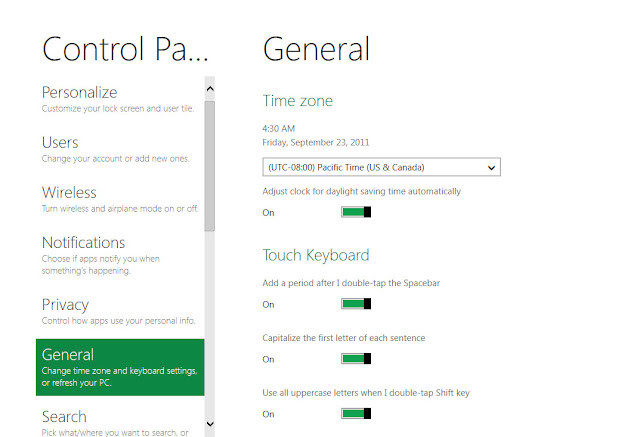
Control panel looks different to, it fits into the new UI design, looks pretty simple and clear. It seems we need to learn which function is where in Windows 8, as we had to do in Vista, fortunately we can switch back to the old control panel by clicking on the last "More Settings" menu. Using this, Windows switches back to the classic desktop view again.

As a Google Chrome user my first step on an empty system is to install it. I did this on Windows 8 too, it works well but of course in the classic desktop mode only. I'm curious about how the 3rd party browsers and other software will integrate into the new UI later.
Some useful shortcuts to use the new features:
I'll dig deeper in my follow up posts about Windows 8 in the system, we'll see how it works in the everyday usage.

Okay, so this is how Windows 8 looks after startup. Pretty new and different than we got used to. I'm using a 24" LCD so these tiles looks huge. I can use my computer at the maximum range of my wireless keyboard and mouse... but I don't want to. My first thought about it that a size adjustment would be good... maybe I'll find it somewhere in the options later.
So let's browse the web.

Hmm, our title part with URL field and buttons moved to the bottom... but why? Usually we start reading on the top (where we enter the website address) then looks below to the content, aren't we? This is weird, so weird. I'm curious about the final release that Microsoft will keep this layout or redesign it later. I still not feeling this UI right for a desktop computer.... it is good for a phone or a tablet anyway. I have an iPad so I have experience of using a tablet, and I can imagine this UI in my palm, but not on my desk.
Let's try Explorer.

Wow, it jumped to the good and old desktop view. It seems Windows Explorer doesn't have a new UI yet to fit in the tiles layout as Internet Explorer, but Microsoft put the ribbon thing on it. It seems useful on the Explorer, much easier to see the functions compared to the old (hidden) menu layout. I personally don't like the ribbon interface on the Office product line anyway, too complex and it is hard to find functions for a not everyday Office user like me. I simply forget where to find some functions I need and also some frequently used functions need more clicks and navigation to reach. So it seems the Desktop is almost like the same as we get used to on Windows 7, except the start menu part. If we click on it, Windows shows the tiles as you see on the first screen shot.

Control panel looks different to, it fits into the new UI design, looks pretty simple and clear. It seems we need to learn which function is where in Windows 8, as we had to do in Vista, fortunately we can switch back to the old control panel by clicking on the last "More Settings" menu. Using this, Windows switches back to the classic desktop view again.

As a Google Chrome user my first step on an empty system is to install it. I did this on Windows 8 too, it works well but of course in the classic desktop mode only. I'm curious about how the 3rd party browsers and other software will integrate into the new UI later.
Some useful shortcuts to use the new features:
- Win key - switch between the new tiles screen and the running application
- Win key + C - brings up the start menu, as shows some information and clock hover on the screen
- Win key + F - brings up the Search screen side menu
- Win key + Z - brings up the contextual menus for Metro-style apps
- Win key + D - switches to the desktop
- Win key + L - locks the computer and shows the new lock screen
- Win key + P - multi-monitor settings side menu
- Win key + I - brings up the Settings side menu
- Win key + Y - makes all open windows (and the Metro UI) transparent
I'll dig deeper in my follow up posts about Windows 8 in the system, we'll see how it works in the everyday usage.
Let's begin
Okay, so let's start right in the middle. I decided to start this blog as I mostly looking for such types too... so why not writing one rather just reading these..
I'll publish reviews, tests, interesting stuff about IT, cars, photography and anything that comes in my sight and seems good. My English is not perfect, I'm from Hungary, a small place from the eastern side of Europe. This first post was nothing interesting really, just need to start somewhere, right? So let's begin.
I'll publish reviews, tests, interesting stuff about IT, cars, photography and anything that comes in my sight and seems good. My English is not perfect, I'm from Hungary, a small place from the eastern side of Europe. This first post was nothing interesting really, just need to start somewhere, right? So let's begin.
Subscribe to:
Posts (Atom)